



















Cute Gacha Characters

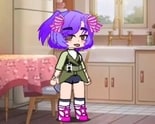

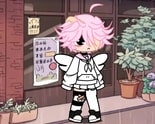
You open the hairstyle panel first, scroll past a dozen options, and settle on a short bob before you’ve even touched the eyes. Cute Gacha Characters starts that way for almost everyone — one panel at a time, no rush, no wrong answers — and by the time you reach the background picker you’re already committed to a character that didn’t exist ten minutes ago.
| Genre | Chibi avatar creator |
| Platforms | Browser, Android, iPhone, iPad |
| Plays logged | 22,000+ |
| Player rating | 81% upvote rate |
Building a Character Piece by Piece in Cute Gacha Characters
There’s no character sheet waiting for you when Cute Gacha Characters loads, just a blank chibi base and a row of category tabs: hairstyle, eyes, mouth, blush, outfit, accessories, background. Each tab swaps out one layer of the drawing without touching the rest, so a hairstyle change never resets the outfit you already picked.
The kawaii format keeps every option in the same rounded, oversized-head chibi proportions, which means mismatched pieces rarely look broken the way they can in more realistic dress-up tools. A neon accessory sits fine next to a pastel outfit because the whole art style is built to absorb clashing choices.
Most players cycle through hairstyle and eyes first, then treat outfit and accessories as the slower, more deliberate part of the build. That order isn’t enforced by Cute Gacha Characters itself, but it’s the pattern that shows up in how the panels are ordered left to right.
What the Blush and Background Tabs Actually Change
Blush is easy to skip past, but it’s doing more work than it looks like — a heavier blush setting shifts a character from neutral to visibly shy or flustered without changing a single other piece. Background does something different: it sets the mood of the finished image rather than the character itself, which matters once you get to the export step.
Players who screenshot their builds tend to treat background as the last decision, not an early one, since it’s the one panel that can make an otherwise finished character look unfinished if picked too soon.
Saving and Sharing Your Build
Cute Gacha Characters lets you export a finished character as an image once every panel has something selected, and that export step is where most of the game’s replay value actually lives — players don’t just build one character, they build several and compare which combination of hairstyle and outfit reads best as a static image.
Beginners often export too early, before touching blush or background, and end up with a technically complete but visually flat result. Waiting until every tab has been deliberately chosen, not just defaulted, makes a noticeable difference in the final export.
What Beginners Get Wrong in Cute Gacha Characters
The most common early mistake is picking hairstyle and eyes and calling it done, skipping accessories entirely because they feel optional. They’re not — accessories are where most of the visual personality comes from once the base proportions are locked in by the kawaii art style itself.
- Hairstyle and eyes — the two panels most players commit to first, since they define the character’s face immediately.
- Outfit and accessories — the slower, more deliberate layer that most separates a rushed build from a finished one.
- Background — best chosen last, since it sets mood rather than character.
How does the export feature work in Cute Gacha Characters?
Once every panel — hairstyle, eyes, mouth, blush, outfit, accessories, background — has an active selection, the finished chibi can be saved as an image directly from the browser, no account or download required.
Do outfit and accessory choices affect anything besides looks?
No stats or gameplay systems sit behind the choices in Cute Gacha Characters — every panel is purely cosmetic, which is part of why players treat it as a fast, low-stakes creative tool rather than a game with objectives.
Can you go back and change an earlier choice without starting over?
Yes, and this is one of the features players rely on most — switching hairstyle after the outfit is already set doesn’t reset anything else, since each panel only controls its own layer.
Cute Gacha Characters works because none of its seven panels ever fight each other — a loud accessory and a pastel background can both stay on screen at once and still read as one coherent chibi. That’s the quiet design decision holding the whole kawaii format together, and it’s why players keep coming back to build one more character instead of stopping at their first export.